DIGIBAU 360: Walk through once. Everything documented.

The 360° helmet attachment captures the entire construction site on every site walk — you simply go your way. Later, you walk through again virtually: through every floor, at every point in the construction phase.

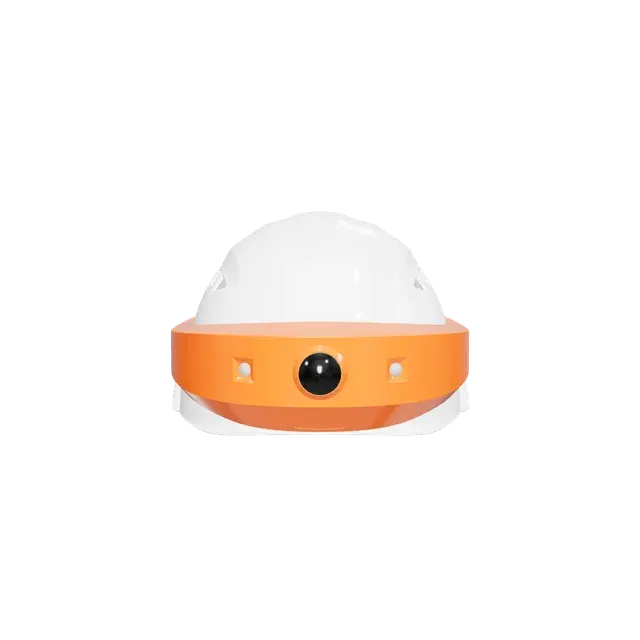
Abstract illustration: construction helmet with a 360-degree camera, surrounded by a glowing orange recording ring [KI-BILD] AI-generated

What is DIGIBAU 360?

DIGIBAU 360 is the 360° camera system from Open Experience for construction documentation: a helmet attachment that automatically takes 360° images during the site walk. The images are automatically located, sorted by time and stored in the platform — the result is a continuous, chronologically complete photographic record of the entire construction phase that you can navigate virtually.

Take it in your hands — right here.

Move your mouse over the helmet and it follows your movement — on a touchscreen, turn it with your finger. Two 12 MP wide-angle cameras and six power LEDs sit protected in the attachment, and you wear the lightweight battery module on your belt.

Interactive 3D view of the DIGIBAU 360 helmet: construction helmet with integrated 360-degree camera system and LED lights

Documenting as you walk — literally.

Put on the helmet, select your position on the construction plan, trigger the shot via the Construction Photos app (our photo documentation app) — even without an internet connection. The 360° images land automatically in your project's gallery, and the plan overview shows every capture position. The mandatory site walk becomes complete documentation.

Plan overview in the software: construction plan with the capture positions of the 360-degree images and viewing-direction arrows

Afterwards, you walk through virtually — as often as you like.

Every site walk becomes a walkable 360° snapshot: you jump from position to position, switch rooms and floors, zoom into the detail — as if you were standing on site once again.

3D navigation in the 360-degree viewer: corridor view with the next clickable capture position

The time machine for your construction site.

The time travel through the construction site via calendar: what was behind the wall before it was closed? Every documented point in time remains walkable — the strongest body of evidence a construction site can have.

Time travel in the 360-degree viewer: the same room with selectable capture dates in the calendar list

The walk-through that measures progress.

From the 360° images, the AI detects work progress automatically and compares it against the target schedule (together with Construction Time).

Defects directly in the 360° view.

The integration with Construction Defects shows existing items in the 3D image — and you record new items directly from the view: defects, tasks, occupational safety, housekeeping.

Construction Defects integration in the 360-degree image: defect pin directly in the panorama view of a corridor

GDPR-proof from the moment of capture.

DIGISCHUTZ pixelates people and faces automatically — document the construction site without capturing the people on it. Servers located in Germany.

Sees even where it is dark.

Six power LEDs light up rooms without site power — with a flash function for the shot and a light-on mode for walking through windowless floors.

DIGIBAU 360 helmet from the side with the power LEDs switched on at the orange camera attachment

One system, not a DIY kit.

Construction helmet with integrated camera system, lightweight battery module with status display on your belt, rugged carrying case with an insert for all components. Device, software, positioning and support from a single source — no consumer-camera accessories with a third-party subscription.

DIGIBAU 360 carrying case with insert: helmet attachment, battery module and power supply stowed securely

Works together with: Construction Photos (image archive), Construction Defects (create a defect from the 360° image), Construction Diary (site walk in the report), Construction Time (AI progress detection from the walk-throughs).

DIGIBAU 360 in detail

From the camera system to time travel: the complete range of functions of the 360° system — hardware, control and viewer.

Camera system
  • Two 12 MP cameras with high-quality wide-angle lenses
  • Complete 360° images in a single shot
  • Integrated and protected in the helmet attachment
  • Powerful processor, dual Wi-Fi
LED lighting
  • Six power LEDs for dark rooms
  • Flash function when capturing images
  • Light-on mode for illuminating rooms
Battery module
  • Worn on the belt or carried in a pocket
  • Lightweight and unobtrusive during the walk-through
  • Status and battery display, replaceable
  • Quick change without tools
Carrying case
  • Rugged storage and transport solution
  • Insert for all DIGIBAU components
  • Power supply for charging included
Control via the Construction Photos app
  • Select the capture position on the construction plan — even offline
  • Shutter release, status display and preview view in the app
  • Automatic filing of the 360° images in the project gallery
  • Trigger a new capture directly from the plan overview
360° viewer
  • 3D navigation between the visible capture positions
  • Switch between rooms and floors, zoom
  • Plan overview with all capture positions
  • Time travel via calendar and time-of-day selection
Integration with Construction Defects
  • Existing items directly in the 360° image
  • Record new items from the view — defects, tasks, occupational safety, housekeeping
Typical applications
  • Remote supervision — bring in expert knowledge (MEP, structural engineering, fire protection) without travel
  • Collaborative clarification between contract parties on the same 360° image
  • Damage investigation and preservation of evidence

The walk-through that makes history

  • Introduced in 2022 as a world first — the 360° helmet camera system for construction documentation.
  • One site walk, one complete tour: nobody has to decide in advance what gets photographed.
  • Every place can be called up again at any point in time — long after the wall has been closed.

Frequently asked questions

How does a capture work?

Select the position on the construction plan (even offline), trigger the shot via the Construction Photos app, check the preview view — the app is available free of charge in the App Store.

How do the images get into the software?

Automatically: the 360° images are stored in the project gallery, located via the selected plan position and sorted by time; the plan overview shows all capture positions.

How much does DIGIBAU 360 cost?

Conditions on our pricing page (/en/preise/) or in a personal conversation.

Is it GDPR-compliant?

Yes — automatic pixelation of people and faces (DIGISCHUTZ), servers located in Germany.

Is there help with the setup?

Yes, a personal introduction; the device guides at the familiar help address (QR code on the device) remain available.

Walk through your construction site virtually — in a demo with real data.